Sconce & Socket earns a commission on qualifying purchases made through links on this page, at no extra cost to you. It does not change which products we pick. Full disclosure.
| # | Product | Best for | Lumens | Price |
|---|---|---|---|---|
| 01 | 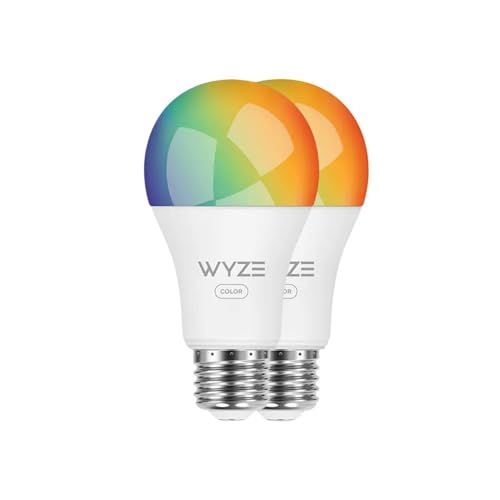 Wyze Wyze Bulb Color Doing every room at once on a small budget | A bulb swap on your own Wi-Fi. No hub required. | 1,100 lm | $31.97 - View on Amazon #ad Price as of October 26, 2026. How we earn |
| 02 | Sengled Matter LED Smart Light Bulb Matter-first homes that want no vendor lock-in | A bulb swap. No hub, no switch change, no wiring. | Not published | Check price on Amazon #ad No live price right now, so we show none. How we earn |
| 03 |  LIFX SuperColor BR30 Smart Bulb Recessed cans you want to dim and tune without rewiring | A bulb swap. Fully reversible. | 1,100 lm | $39.98 - View on Amazon #ad Price as of October 26, 2026. How we earn |
| 04 |  Feit Electric BR30 Smart Flood Light Bulb, RGBW, 2-Pack (BR30/RGBW/CA/AG) A couple of cans, bought from a hardware shelf | A bulb swap. Fully reversible. | 650 lm | $19.68 - View on Amazon #ad Price as of October 26, 2026. How we earn |
| 05 |  TP-Link Kasa Matter Smart Plug EP25 Making a lamp smart without changing its bulb | Plugs in. No wiring, no switch change, nothing fixed. | n/a - controls a lamp, does not light |
Specifications are the manufacturer or retailer published figures, compiled by hand. We have not measured them, and where a figure is not published we write "Not published" rather than guess.
01
Two ways a bulb reaches Google Home
"Works with Google" on a box covers two quite different arrangements, and it is worth knowing which one you are buying.
- Account linking. The bulb is set up in its maker's own app, and that account is then linked to Google Home. Google sends the command to the maker, and the maker's service passes it on. It works, but it depends on that app and account continuing to exist.
- Matter. A shared standard that Google Home, Alexa and Apple Home all support. A Matter bulb is added in the Google Home app directly, so it does not depend on one maker's account - and it will still work if you change assistant. The detail is in Matter smart bulbs explained.
Neither route needs a hub for the picks below. The difference is lock-in, not convenience on day one.
| Pick | Connects via | Published output | Hub |
|---|---|---|---|
| Wyze Bulb Color | Maker's app, linked to Google | 1,100 lm | None |
| Sengled Matter A19 | Matter | Not published | None |
| LIFX SuperColor BR30 | Maker's app or Matter | 1,100 lm | None |
| Feit Electric BR30 smart | Maker's app, linked to Google | 650 lm | None |
| Kasa EP25 smart plug | Matter | n/a - switches a lamp | None |
02
The picks
Wyze Bulb Color - the pick for most rooms. 1,100 published lumens, tunable white plus color, no bridge, and support for Google and Alexa without extra hardware. At 1,100 lumens it is bright enough to be a room's real light rather than an accent, and multipacks are priced for doing a whole apartment at once.
Cons: CRI is not published; it is tied to Wyze's app and account; and every Wi-Fi bulb takes a place on your router.
Sengled Matter A19 - the pick if you might switch assistant. A Matter bulb with no hub, so it answers to Google Home, Alexa and Apple Home on equal terms. If there is any chance the household ends up on a different assistant, this is the one that follows you.
Cons: lumens and CRI are not published per SKU; tunable white only, no color; and Matter setup can be fiddly on older routers.
LIFX SuperColor BR30 - for recessed cans. 1,100 lumens from a reflector bulb, no hub, and published support for Google, Alexa, Apple Home and Matter. It turns a ceiling of fixed cans into a dimmable, tunable layer you control by voice. The can-light comparison is in best smart BR30 bulbs.
Cons: CRI not published; expensive once you have six cans; and it goes offline when the wall switch is flipped.
Feit Electric BR30 smart - for one or two cans from a hardware shelf. 650 lumens over Wi-Fi with no hub, working with Google Assistant or Alexa, and widely stocked so it is easy to match later. Feit publishes CRI 90 for it, which is more than most color smart bulbs will commit to.
Cons: 650 lumens is modest for a high ceiling; 2.4GHz Wi-Fi only; and Feit's spec table marks it non-dimmable while the description sells app dimming.
Kasa EP25 smart plug - for a lamp with a bulb you already like. Not a bulb at all: a Matter plug that puts any lamp under Google Home control, so the high-CRI bulb you chose stays in the lamp. The trade-offs are in smart bulb vs smart plug.
Cons: switches only - it does not dim; and it occupies the outlet.
03
Setting it up so it keeps working
Name bulbs by room, not by brand. Google Home groups lights into rooms, and "turn off the bedroom" only works if the bulbs are assigned to the bedroom. Do it at setup, not later.
Keep the wall switch on. A smart bulb with no power cannot hear anything. If people in the house reach for the switch out of habit, a smart switch on that circuit is the fix - compared in smart bulbs vs smart switches.
Mind the router. Every Wi-Fi bulb is another device on the network. A handful is fine; a ceiling of cans on a basic router is where drop-outs start. The radio options are compared in Wi-Fi vs Bluetooth vs Thread.
Use routines for the boring part. Lights on at sunset and off at bedtime is where smart bulbs earn their price - see schedules worth setting up.
The picks
Every pick in full
01
Doing every room at once on a small budget
Wyze Wyze Bulb Color
#ad Price as of October 26, 2026. How we earn
1,100 lumens per bulb with no bridge, at a price that makes a five-bulb apartment realistic rather than a project you do one room at a time.
| Lumens | 1,100 lm |
|---|---|
| Color temperature | Tunable white plus color |
| CRI | Not published |
| Power source | Screws into a standard E26 socket |
| Dimmable | Yes - in app |
| Renter-safe method | A bulb swap on your own Wi-Fi. No hub required. |
What it gets right
- 1,100 lumens at the budget end of the market
- No bridge, and multipacks are priced for whole-home use
- Works with Alexa and Google without extra hardware
What it costs you
- CRI is not published
- Tied to one vendor's app and account
- Wi-Fi bulbs multiply fast on a small router
Spec source: PCWorld smart bulb guide (attributed) - retrieved September 3, 2026.
02
Matter-first homes that want no vendor lock-in
Sengled Matter LED Smart Light Bulb
#ad No live price right now, so we show none. How we earn
A Matter bulb with no hub, which means it answers to Apple Home, Google Home and Alexa on equal terms instead of picking a side for you.
| Lumens | Not published |
|---|---|
| Color temperature | Tunable white |
| CRI | Not published |
| Power source | Screws into a standard E26 socket |
| Dimmable | Yes - in app |
| Renter-safe method | A bulb swap. No hub, no switch change, no wiring. |
What it gets right
- Matter native, so it is not stranded if you change phone ecosystem
- No hub and no bridge
- Priced for whole-home coverage
What it costs you
- Lumens and CRI are not published per SKU
- Matter setup can still be fiddly on older routers
- Tunable white only in this version - no color
Spec source: Smart Home Explorer guide (attributed) - retrieved September 3, 2026.
03
Recessed cans you want to dim and tune without rewiring
LIFX SuperColor BR30 Smart Bulb
#ad Price as of October 26, 2026. How we earn
1,100 lumens per bulb with no hub required and Matter support - the brightest smart reflector here, and the one least likely to be stranded.
| Lumens | 1,100 lm |
|---|---|
| Color temperature | Tunable white plus color |
| CRI | Not published |
| Power source | Screws into a standard E26 socket |
| Dimmable | Yes, in-app |
| Renter-safe method | A bulb swap. Fully reversible. |
What it gets right
- 1,100 lm is the highest published output of the smart reflectors here
- No hub required, and it works with Alexa, Google, Apple Home and Matter
- Turns fixed recessed cans into a dimmable, tunable layer with no wiring
What it costs you
- CRI is not published on the BR30
- Loses power - and therefore control - when the wall switch is flipped
- Expensive per can once you have six of them
Spec source: LIFX - SuperColor BR30 smart bulbs product page - retrieved September 3, 2026.
04
A couple of cans, bought from a hardware shelf
Feit Electric BR30 Smart Flood Light Bulb, RGBW, 2-Pack (BR30/RGBW/CA/AG)
#ad Price as of October 26, 2026. How we earn
650 lumens at a 65W equivalence over 2.4GHz Wi-Fi with no hub, and CRI 90 published - the modest, widely-stocked option when you only need one or two.
| Lumens | 650 lm |
|---|---|
| Color temperature | 2700K-6500K tunable white, plus color |
| CRI | 90 |
| Power source | Screws into a standard E26 socket (7.2W) |
| Dimmable | App dimming is advertised, but Feit's own spec table says No |
| Renter-safe method | A bulb swap. Fully reversible. |
What it gets right
- No hub required, works with Alexa or Google Assistant
- CRI 90 published, which most color smart bulbs do not publish at all
- Widely stocked, so easy to match later
- Honest 650 lm claim rather than an inflated equivalence
What it costs you
- 650 lm is the dimmest of the three - check it against your ceiling height
- 2.4GHz only
- Feit's spec table marks it non-dimmable while the description sells app dimming - the two contradict each other
Spec source: Feit Electric - BR30/RGBW/CA/AG product page (650 lm, 7.2W, 65W replacement, E26, CRI 90, 2700-6500K, 25,000 h, 3-year warranty; spec table lists dimmable: No) - retrieved September 3, 2026.
05
Making a lamp smart without changing its bulb
TP-Link Kasa Matter Smart Plug EP25
Matter native with no hub and built-in energy monitoring, at roughly the price of one smart bulb - and it works with whatever high-CRI bulb you already chose.
| Lumens | n/a - controls a lamp, does not light |
|---|---|
| Color temperature | n/a |
| CRI | n/a |
| Power source | Plugs in between the lamp and the outlet |
| Dimmable | No - switches only. Dimming stays with the bulb. |
| Renter-safe method | Plugs in. No wiring, no switch change, nothing fixed. |
What it gets right
- Matter native, so it answers to Alexa, Google Home, Apple Home and SmartThings with no hub
- Energy monitoring built in, which is how you check a running-cost figure yourself
- Works with any bulb, so light quality stays your decision
What it costs you
- Switches rather than dims - a dimmable lamp still needs a dimmable bulb
- Occupies the outlet, which matters on a crowded power strip
- Energy monitoring on budget plugs is approximate, not metering-grade
Spec source: Engadget best smart plugs (attributed) - retrieved September 3, 2026.
FAQ
Questions people actually ask
+Do smart bulbs need a hub to work with Google Home?
None of the picks here do. They connect over your Wi-Fi or through Matter and are controlled in the Google Home app with no bridge to buy.
+Does Google Home work with Matter bulbs?
Yes. Matter is a shared standard that Google Home, Alexa and Apple Home all support, so a Matter bulb is added in the Google Home app itself and is not tied to one maker's account.
+Can Google Home dim smart bulbs?
Yes - brightness, and color temperature on tunable bulbs, can be set by voice or in the app. A smart plug is different: it switches a lamp on and off but does not dim it.
+Why does my smart bulb stop responding to Google?
The most common reason is that someone turned off the wall switch or the lamp's own switch. The bulb loses power and drops offline until the switch is back on. That is true of every smart bulb.
+Are bulbs for Google Home different from bulbs for Alexa?
Mostly not - many work with both. What differs is how they connect, which is why a Matter bulb is the safest choice if you might change assistant later.
Sources
Where the numbers came from
- PCWorld - best smart bulbs (Wyze Bulb Color, WiZ color A19)
- Smart Home Explorer - best smart bulbs (Sengled Matter A19, LIFX A19)
- LIFX - SuperColor BR30 smart bulbs, 1,100 lm, no hub, Matter
- Feit Electric - BR30/RGBW/CA/AG product page (650 lm, 7.2W, E26, CRI 90, 2700-6500K, no hub)
- Engadget - best smart plugs (Kasa EP25, Matter)
All sources retrieved September 3, 2026.
Next
Read these next
About the author
Sawyer V. An enthusiast who reads the spec sheets and does the arithmetic. No lab, no test bench.