Sconce & Socket earns a commission on qualifying purchases made through links on this page, at no extra cost to you. It does not change which products we pick. Full disclosure.
| # | Product | Best for | Lumens | Price |
|---|---|---|---|---|
| 01 |  LIFX LIFX A19 Smart Bulb Color range and brightness without a bridge | A bulb swap on your own Wi-Fi. No hub and no wiring. | 1,100 lm | $79.96 - View on Amazon #ad Price as of October 19, 2026. How we earn |
| 02 |  WiZ WiZ Connected Color A19 Smart Bulb The cheapest way into hub-free smart lighting | A bulb swap on your own Wi-Fi. No hub, no wiring, no switch change. | Not published | $21.37 - View on Amazon #ad Price as of October 19, 2026. How we earn |
| 03 | Sengled Matter LED Smart Light Bulb Matter-first homes that want no vendor lock-in | A bulb swap. No hub, no switch change, no wiring. | Not published | Check price on Amazon #ad No live price right now, so we show none. How we earn |
| 04 | 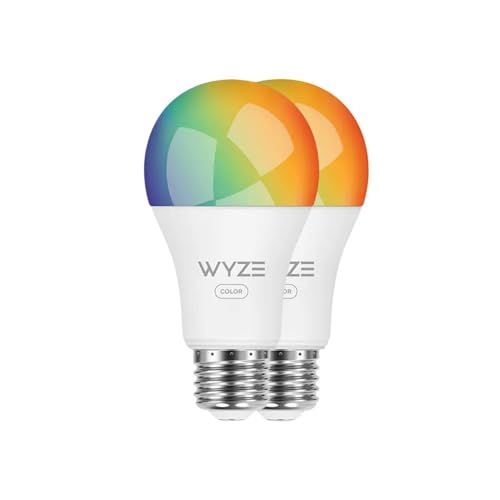 Wyze Wyze Bulb Color Doing every room at once on a small budget | A bulb swap on your own Wi-Fi. No hub required. | 1,100 lm | $31.97 - View on Amazon #ad Price as of October 19, 2026. How we earn |
| 05 |  Govee Smart Color Bulb H6008 Color scenes and music-reactive lighting | A bulb swap on your own Wi-Fi. No hub, nothing installed. | Not published | $39.99 - View on Amazon #ad Price as of October 19, 2026. How we earn |
Specifications are the manufacturer or retailer published figures, compiled by hand. We have not measured them, and where a figure is not published we write "Not published" rather than guess.
01
Why hub-free is the right default for a rental
A hub is a small box that plugs into your router and speaks a radio protocol your phone does not. It is genuinely better at scale - more reliable across a large house, and it keeps dozens of devices off your Wi-Fi. In an apartment with five to ten bulbs it is an extra purchase, an extra thing to power, and an extra thing to remember when you move.
Wi-Fi bulbs skip it entirely. They join the network you already have, they work from a phone app and a voice assistant with nothing in between, and the whole system fits in a box when you leave. That is why every pick here is Wi-Fi.
The honest cost: each bulb takes an address on your network, and a cheap router with twenty devices on it will struggle. If you are lighting a whole house rather than a flat, that is the point at which a hub-based system starts to earn its keep.
02
What to actually compare
| Spec | Why it matters | What to look for |
|---|---|---|
| Lumens | Whether it can be a room's real light or just an accent | 1,100 lm is the top of this category |
| Matter support | Whether it is locked to one ecosystem | Prefer it on anything you will own for years |
| CRI | Whether the white light is any good | Rarely published - treat silence as informative |
| Color vs tunable white | Color costs white-light quality | Buy tunable white unless you want color |
| Price per bulb | Decides whether you do one room or all of them | The cheap ones make whole-home realistic |
The gap on that table is CRI. Most smart bulb makers do not publish it, and the ones that do are the exception rather than the norm. Where a figure is not published we write "Not published" rather than assuming - and if you want a bulb whose white light is genuinely good, buy a high-CRI bulb and leave the smart control for lamps where it is about convenience rather than light quality.
03
The wall switch problem
Every smart bulb shares one flaw: it needs constant power to stay on the network. If anyone turns the light off at the wall, the bulb is not dimmed or scheduled - it is unplugged, and the app cannot reach it.
In a home you share with other people this is a daily annoyance rather than a theoretical one. The usual mitigations:
- Leave the switch on and control with the app or voice. Works, and requires everyone in the house to agree to it.
- Use lamps rather than ceiling fixtures. A lamp with a smart bulb and its own inline switch left on is far less likely to be switched off by habit.
- Add a wireless wall remote. Several ecosystems sell a battery-powered button that sticks beside the real switch. No wiring, and it gives everyone something familiar to press.
The fourth option - replacing the switch itself - is where the bulbs vs switches question starts, and in a rental it usually ends there too.
The picks
Every pick in full
01
Color range and brightness without a bridge
LIFX LIFX A19 Smart Bulb
#ad Price as of October 19, 2026. How we earn
1,100 lumens and CRI 90+ with no bridge required - the one hub-free bulb bright enough to be a room's actual light source rather than an accent.
| Lumens | 1,100 lm |
|---|---|
| Color temperature | Tunable white plus color |
| CRI | 90+ |
| Power source | Screws into a standard E26 socket |
| Dimmable | Yes - in app |
| Renter-safe method | A bulb swap on your own Wi-Fi. No hub and no wiring. |
What it gets right
- 1,100 lumens - genuinely enough to light a small room from one socket
- CRI 90+ published, unusual for a color smart bulb
- No bridge to buy, power or find shelf space for
What it costs you
- Two to three times the price of a WiZ bulb
- Wi-Fi only, so it depends on router coverage
- Still offline if someone kills the wall switch
Spec source: Smart Home Explorer guide (attributed) - retrieved September 3, 2026.
02
The cheapest way into hub-free smart lighting
WiZ WiZ Connected Color A19 Smart Bulb
#ad Price as of October 19, 2026. How we earn
Wi-Fi and Matter with no bridge to buy, at roughly the price of two ordinary bulbs - the sensible default when you are lighting a rental you may leave next year.
| Lumens | Not published |
|---|---|
| Color temperature | Tunable white plus color |
| CRI | Not published |
| Power source | Screws into a standard E26 socket |
| Dimmable | Yes - in app |
| Renter-safe method | A bulb swap on your own Wi-Fi. No hub, no wiring, no switch change. |
What it gets right
- No bridge, no hub, nothing extra plugged into the router
- Matter support, so it is not locked to one ecosystem
- Cheap enough to do a whole apartment rather than one room
What it costs you
- Wi-Fi bulbs each take an address on your network
- CRI and lumen figures are not published per SKU
- Anyone flipping the wall switch takes the bulb offline
Spec source: PCWorld smart bulb guide (attributed) - retrieved September 3, 2026.
03
Matter-first homes that want no vendor lock-in
Sengled Matter LED Smart Light Bulb
#ad No live price right now, so we show none. How we earn
A Matter bulb with no hub, which means it answers to Apple Home, Google Home and Alexa on equal terms instead of picking a side for you.
| Lumens | Not published |
|---|---|
| Color temperature | Tunable white |
| CRI | Not published |
| Power source | Screws into a standard E26 socket |
| Dimmable | Yes - in app |
| Renter-safe method | A bulb swap. No hub, no switch change, no wiring. |
What it gets right
- Matter native, so it is not stranded if you change phone ecosystem
- No hub and no bridge
- Priced for whole-home coverage
What it costs you
- Lumens and CRI are not published per SKU
- Matter setup can still be fiddly on older routers
- Tunable white only in this version - no color
Spec source: Smart Home Explorer guide (attributed) - retrieved September 3, 2026.
04
Doing every room at once on a small budget
Wyze Wyze Bulb Color
#ad Price as of October 19, 2026. How we earn
1,100 lumens per bulb with no bridge, at a price that makes a five-bulb apartment realistic rather than a project you do one room at a time.
| Lumens | 1,100 lm |
|---|---|
| Color temperature | Tunable white plus color |
| CRI | Not published |
| Power source | Screws into a standard E26 socket |
| Dimmable | Yes - in app |
| Renter-safe method | A bulb swap on your own Wi-Fi. No hub required. |
What it gets right
- 1,100 lumens at the budget end of the market
- No bridge, and multipacks are priced for whole-home use
- Works with Alexa and Google without extra hardware
What it costs you
- CRI is not published
- Tied to one vendor's app and account
- Wi-Fi bulbs multiply fast on a small router
Spec source: PCWorld smart bulb guide (attributed) - retrieved September 3, 2026.
05
Color scenes and music-reactive lighting
Govee Smart Color Bulb H6008
#ad Price as of October 19, 2026. How we earn
Hub-free color with an unusually deep scene library - the pick when the point of smart lighting is atmosphere rather than switching a lamp on from bed.
| Lumens | Not published |
|---|---|
| Color temperature | Tunable white plus color |
| CRI | Not published |
| Power source | Screws into a standard E26 socket |
| Dimmable | Yes - in app |
| Renter-safe method | A bulb swap on your own Wi-Fi. No hub, nothing installed. |
What it gets right
- Large built-in scene library rather than a color wheel and good luck
- Music-reactive modes included at no extra cost
- No hub or bridge
What it costs you
- No published lumen or CRI figures
- Color bulbs are dimmer in white mode than a plain white bulb
- The app wants an account
Spec source: Powers of 10 roundup (attributed) - retrieved September 3, 2026.
FAQ
Questions people actually ask
+Do smart bulbs need a hub?
Wi-Fi bulbs do not - they join your home network directly. Zigbee and Thread bulbs generally do need a bridge or a border router, which is often built into a speaker or TV box you already own. Every pick on this page connects over Wi-Fi with nothing extra to buy.
+Is a Wi-Fi smart bulb worse than a hub-based one?
It trades scale for simplicity. Hub-based systems are more robust across a large house and do not put every bulb on your Wi-Fi. In an apartment with five to ten bulbs, Wi-Fi is simpler, cheaper and one less box to power and leave behind.
+What is Matter and does it matter?
Matter is a cross-vendor standard, so a Matter bulb works with Apple Home, Google Home and Alexa on equal terms instead of picking a side. For a bulb you might own for years across a change of phone or speaker, it is genuinely worth preferring.
+Why does my smart bulb go offline?
Almost always because someone used the wall switch. A smart bulb needs constant power to stay on the network - cutting power at the switch is the equivalent of unplugging it. This is the single biggest practical drawback of bulb-based smart lighting.
+Are smart bulbs allowed in a rental?
Yes. A smart bulb is a bulb - screwing one in is not an alteration to the property and needs nobody's permission. Smart switches are different, because replacing a switch is electrical work. That distinction is the whole reason this site favors bulbs.
Sources
Where the numbers came from
- PCWorld - Best smart lighting guide
- Smart Home Explorer - Best smart bulbs 2026
- Powers of 10 - Best smart light bulbs that do not require a hub
All sources retrieved September 3, 2026.
Next
Read these next
About the author
Sawyer V. An enthusiast who reads the spec sheets and does the arithmetic. No lab, no test bench.