Sconce & Socket earns a commission on qualifying purchases made through links on this page, at no extra cost to you. It does not change which products we pick. Full disclosure.
| # | Product | Best for | Lumens | Price |
|---|---|---|---|---|
| 01 |  BenQ e-Reading LED Desk Lamp A desk used for screen work and paper in the same session | Sits on the desk and plugs in. Nothing fixed to anything. | Not published | $249.00 - View on Amazon #ad Price as of October 26, 2026. How we earn |
| 02 | 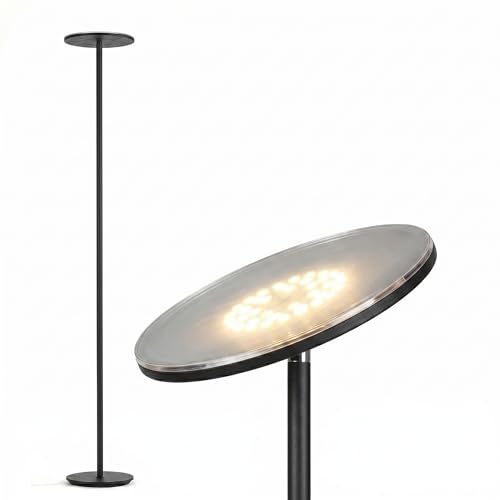 Brightech Sky LED Torchiere Floor Lamp Whole-room light from one outlet | Plugs into an outlet. No drilling, no fixing, no ceiling box. | 2,190 lm | $74.99 - View on Amazon #ad Price as of October 26, 2026. How we earn |
| 03 |  BenQ ScreenBar Halo Monitor Light Bar Lighting the desk for screen work without glare on the monitor | Sits on top of the monitor. Nothing fixed. | Not published (800 lux at desk center from 45 cm) | $199.00 - View on Amazon #ad Price as of October 26, 2026. How we earn |
| 04 |  Logitech Litra Glow Streaming Light (946-000001) A small monitor-mounted light for everyday calls | Clips to the monitor. Nothing fixed. | 250 lm maximum | $7.49 - View on Amazon #ad Price as of October 26, 2026. How we earn |
Specifications are the manufacturer or retailer published figures, compiled by hand. We have not measured them, and where a figure is not published we write "Not published" rather than guess.
01
Three layers, none on the ceiling
A ceiling light in an office mostly lights the tops of things. The light that matters for work is on the desk, close to the paper and keyboard - so an office with no ceiling light is starting from a better place than it looks.
What it needs is three layers, each doing one job. A task light for the desk; a floor lamp for the room, so you are not working in a bright pool in the dark; and, if you are on calls, a light for your face. The general principle is in layered lighting.
| Layer | Job | Pick | Published figure |
|---|---|---|---|
| Task | Paper, keyboard, desk surface | BenQ ScreenBar Halo | 800 lux at desk center |
| Task, alternative | A lamp for paper and screen | BenQ e-Reading | CRI 95+ |
| Room | General light so the room is not dark | Brightech Sky torchiere | 2,190 lm at 3000K |
| Face | Video calls | Logitech Litra Glow | 250 lm, CRI 93 |
02
The picks
BenQ e-Reading desk lamp - the desk light. CRI 95+ over a wide asymmetric spread, with a screen mode, a paper mode and auto-dimming against the room. It lights the whole desk rather than one hot spot, which matters more when there is no ceiling light to fill in around it.
Cons: lumens not published; a large base and arm.
Brightech Sky torchiere - the room light. 2,190 published lumens at 3000K, aimed at the ceiling so it spreads across the room, with a touch dimmer. One lamp in a corner does the job a ceiling fixture would have done.
Cons: integrated LED; CRI not published.
BenQ ScreenBar Halo - if desk space is tight. 800 lux at the center of the desk from a bar on top of the monitor, CRI 95+, stepless 2700K to 6500K - task light that takes no desk space at all.
Cons: lights the desk, not your face; rated in lux, not lumens.
Logitech Litra Glow - for your face on calls. 250 lumens at CRI 93 across 2700K to 6500K, clipped to the monitor and powered by USB. More options are in best lighting for video calls.
Cons: needs a USB-A port; 250 lumens will not overpower a window behind you.
03
Setting it up
Keep light off the screen. A desk lamp that shines at the monitor washes it out. Aim the task light at the desk surface, or use a monitor bar designed to light the desk and not the screen. Glare is covered in glare and visual comfort.
Put the room light behind or beside the desk. A torchiere in the corner behind you lifts the room without shining in your eyes or reflecting in the screen.
Plan the outlets. Three layers can mean three plugs. Map the outlets before buying - see outlet planning.
Switch it all at once. A smart plug on the torchiere lets it come on with a schedule or a voice command, so there is no fumbling in a dark room - see smart plugs for lamps.
The picks
The products behind this page
01
A desk used for screen work and paper in the same session
BenQ e-Reading LED Desk Lamp
#ad Price as of October 26, 2026. How we earn
CRI 95+ over a wide asymmetric spread, with a screen mode and a paper mode - the desk lamp that stops you choosing between lighting the page and washing out the monitor.
| Lumens | Not published |
|---|---|
| Color temperature | Adjustable across multiple settings |
| CRI | 95+ |
| Power source | Plugs in (integrated LED) |
| Dimmable | Yes - plus an ambient light sensor for auto-dimming |
| Renter-safe method | Sits on the desk and plugs in. Nothing fixed to anything. |
What it gets right
- CRI 95+ published, which almost no desk lamp states
- Wide asymmetric spread rather than a single hot pool on the desk
- Auto-dimming against room light, so it stays comfortable as the day changes
What it costs you
- Lumen output is not published
- Several times the price of an ordinary desk lamp
- Large base and arm - it needs real desk space
Spec source: The Wearify high-CRI desk light roundup (published specification, attributed) - retrieved September 3, 2026.
02
Whole-room light from one outlet
Brightech Sky LED Torchiere Floor Lamp
#ad Price as of October 26, 2026. How we earn
The one lamp here that publishes its own output: 2,190 lumens at 3000K from an integrated LED, aimed at the ceiling so the whole room lifts rather than one corner.
| Lumens | 2,190 lm |
|---|---|
| Color temperature | 3000K |
| CRI | Not published |
| Power source | Plugs in (corded, 30W integrated LED) |
| Dimmable | Yes - touch dimmer on the pole |
| Renter-safe method | Plugs into an outlet. No drilling, no fixing, no ceiling box. |
What it gets right
- Publishes a real lumen figure, which most lamp brands do not
- 3000K is the safest single color temperature for a shared living space
- Uplight bounces off the ceiling, so it fills a room instead of pooling
What it costs you
- Integrated LED - when it eventually fails you replace the lamp, not a bulb
- CRI is not published, so color accuracy is unknown
- Needs about 10 inches of floor space and a nearby outlet
Spec source: Brightech product page - retrieved September 3, 2026.
03
Lighting the desk for screen work without glare on the monitor
BenQ ScreenBar Halo Monitor Light Bar
#ad Price as of October 26, 2026. How we earn
800 lux at the center of the desk from a bar on top of the monitor, with CRI 95+ and stepless 2700K to 6500K - desk light for screen work rather than a face light.
| Lumens | Not published (800 lux at desk center from 45 cm) |
|---|---|
| Color temperature | 2700K - 6500K, stepless |
| CRI | 95+ |
| Power source | USB (5V, up to 1.3A) |
| Dimmable | Yes - wireless controller, plus auto-dimming |
| Renter-safe method | Sits on top of the monitor. Nothing fixed. |
What it gets right
- CRI 95+ published
- Auto-dimming holds the desk at a set level
- Takes no desk space at all
What it costs you
- Rated in lux on the desk, not in lumens
- Lights the desk, not your face - on its own it will not fix a dark video image
- The wireless controller runs on AAA batteries
Spec source: BenQ - ScreenBar Halo specifications - retrieved September 3, 2026.
04
A small monitor-mounted light for everyday calls
Logitech Litra Glow Streaming Light (946-000001)
#ad Price as of October 26, 2026. How we earn
250 lumens at CRI 93 across 2700K to 6500K, powered from a USB port on a monitor mount - small, soft, and enough for a face at arm's length.
| Lumens | 250 lm maximum |
|---|---|
| Color temperature | 2700K - 6500K |
| CRI | 93 |
| Power source | USB (USB-C to USB-A cable) |
| Dimmable | Yes - app or controls on the light |
| Renter-safe method | Clips to the monitor. Nothing fixed. |
What it gets right
- CRI 93 published
- Runs from a computer USB port - no extra adapter
- The monitor mount keeps the desk clear
What it costs you
- 250 lumens is a fraction of a desk panel's output
- Needs a USB-A port
- No battery, so it lives on the monitor
Spec source: Logitech support - Litra Glow specifications - retrieved September 3, 2026.
FAQ
Questions people actually ask
+How do you light a home office with no overhead light?
In three layers: a task light on the desk for paper and keyboard, a floor lamp for general room light, and - if you are on video calls - a small light in front of your face. None of them needs a ceiling fixture.
+Is a floor lamp enough for a home office?
For room light, often yes - a torchiere like the Brightech Sky publishes 2,190 lumens. But it will not light the desk properly on its own; you still need a task light close to the work.
+What is the best desk light when there is no ceiling light?
One that lights the whole desk evenly without reflecting off the screen. The BenQ e-Reading lamp publishes CRI 95+, and the BenQ ScreenBar Halo puts 800 lux on the desk from the top of the monitor.
+Why do I look dark on video calls in this room?
Usually because the brightest light is behind or above you. A small light in front of your face, such as the Logitech Litra Glow, fixes it - covered in best lighting for video calls.
+Do I need an electrician to add light to a home office?
No. Every light here plugs in or runs from a USB port, so nothing is wired and everything moves with you.
Sources
Where the numbers came from
- The Wearify - high-CRI desk light roundup (BenQ e-Reading, CRI 95+)
- Brightech - Sky LED torchiere product page, 2,190 lm at 3000K
- BenQ - ScreenBar Halo specifications (800 lux at 45 cm, CRI 95+)
- Logitech support - Litra Glow specifications (250 lm, 2700K - 6500K, CRI 93)
- SuperBrightLEDs - IES residential recommended lighting levels
All sources retrieved September 3, 2026.
Next
Read these next
About the author
Sawyer V. An enthusiast who reads the spec sheets and does the arithmetic. No lab, no test bench.