Sconce & Socket earns a commission on qualifying purchases made through links on this page, at no extra cost to you. It does not change which products we pick. Full disclosure.
| # | Product | Best for | Lumens | Price |
|---|---|---|---|---|
| 01 |  Philips Hue Hue White and Color Ambiance A19, 75W Equivalent (1,100 lm) The most complete smart lighting system, if you buy into it | A bulb swap, plus a Bridge plugged in for the full system. Nothing wired. | 1,100 lm (at 4000K) | $239.99 - View on Amazon #ad Price as of September 27, 2026. How we earn |
| 02 |  Govee Smart Color Bulb H6008 Color scenes and music-reactive lighting | A bulb swap on your own Wi-Fi. No hub, nothing installed. | Not published | |
| 03 | 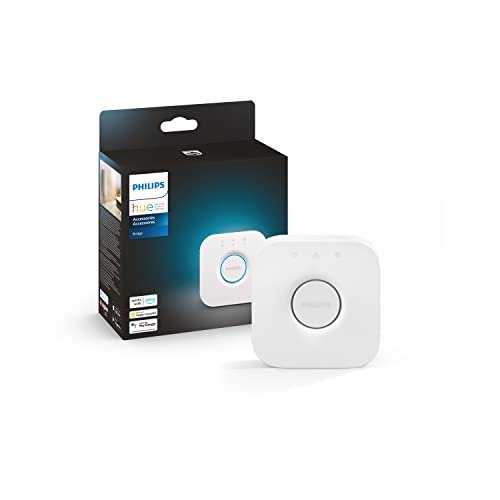 Philips Hue Hue Bridge Unlocking the full Hue system - Matter, remote control, automations | Plugs in. Nothing wired or fixed. | n/a - a hub, not a light | |
| 04 |  Govee M1 Smart LED Strip Light (RGBICWW) Color effects with a warm white that is actually usable | Adhesive backing. Use a channel or tape underlayer on paint. | Not published | $59.99 - View on Amazon #ad Price as of September 27, 2026. How we earn |
Specifications are the manufacturer or retailer published figures, compiled by hand. We have not measured them, and where a figure is not published we write "Not published" rather than guess.
01
They are selling two different things
Hue is a system. The bulbs talk Zigbee to a Bridge that sits on your router, and that Bridge is what gives you control from outside the house, scenes that fire on a schedule, Matter support, and hardware switches that work when your phone is in another room. You buy into it once and extend it a socket at a time for years.
Govee sells effects. The lights join your own Wi-Fi with nothing in between, the app ships with a deep library of scenes and music-reactive modes, and the price per socket is a fraction of Hue's. It is the faster, cheaper way to make one wall or one television look good tonight.
Neither of those is wrong. The mistake is buying Hue for a single color strip behind a television, or buying Govee for the lighting of a whole house you intend to control by wall switch and schedule for the next five years.
| Philips Hue | Govee | |
|---|---|---|
| Network | Zigbee to a Bridge, or Bluetooth without one | Your own Wi-Fi, plus Bluetooth |
| Published output | 1,100 lm for the 75W-equivalent A19 | No lumen figure for the H6008 or M1 |
| Published CRI | Above 80 | Not published |
| Dimming floor | 0.2% | Not published |
| Hardware controls | Hue Dimmer Switch, Lutron Aurora, Pico-style remotes | App and voice; no first-party wall control |
| Away-from-home control | Yes, with a Bridge | Yes, over your internet connection |
| Extra hardware needed | A Bridge for the full system | None |
| Cost per socket | Highest here | A fraction of Hue |
02
The five things that actually decide it
- How many lights you will end up with. Without a Bridge, Hue caps Bluetooth control at 10 lights and only inside Bluetooth range. Past that the Bridge is not optional, and the cost of the system changes.
- Whether anyone else in the house uses a wall switch. Smart bulbs die when someone flips the switch off. Hue has a first-party answer - a battery dimmer that sticks to the wall - and works with the Lutron Aurora, which physically locks the toggle on. Govee has no equivalent. This is the most common reason smart lighting gets abandoned, and it is covered in smart lighting troubleshooting.
- Whether you need a number. Hue publishes lumens, CRI and a dimming floor. Govee publishes none of those for these products. If the lights are decorative that does not matter; if they are the light you read by, it does.
- What happens when the internet drops. Zigbee runs locally between the Bridge and the bulbs, so schedules keep firing. Wi-Fi lights on a dead router fall back to Bluetooth at best.
- Scenes versus light. Govee's scene library and music modes are genuinely better value if atmosphere is the point. Hue's advantage is boring and long-term: it still works the same way in three years.
03
The picks on each side
Hue White and Color Ambiance A19 - the system bulb. 1,100 lumens with tunable white and color, dimmable to 0.2%, which is lower than most smart bulbs will go and the difference between a bedroom at 2am being usable or blinding.
Cons: without a Bridge you are limited to 10 lights in Bluetooth range with no control from outside the house; the Bridge is a separate purchase; CRI above 80 is ordinary for the money.
Hue Bridge - the part that makes it a system. This is what turns a handful of bulbs into schedules, remote control and Matter. If you are buying Hue at all, budget for it from the start rather than discovering it later.
Cons: it is an extra box, an extra outlet and an extra network port, and it only earns its place if you have more than a few lights.
Govee Smart Color Bulb H6008 - the scene bulb. Hub-free color with a much deeper scene library than Hue ships with, and music-reactive modes at no extra cost. For a lamp whose job is atmosphere, this is the better buy by a wide margin.
Cons: no published lumen or CRI figure at all; color bulbs are dimmer in white mode than a plain white bulb; the app wants an account.
Govee M1 LED strip - the reason most people buy Govee. RGBICWW means individually addressable segments plus dedicated warm white emitters, so the strip is usable as ordinary light rather than only as color.
Cons: output is not published; the adhesive is the usual risk on painted surfaces; the controller box needs somewhere to live.
04
Who should pick which
Pick Hue if you expect more than a handful of lights, other people in the house use wall switches, you want schedules that keep running when the internet does not, or you want the light to be good light as well as colored light. The full case is in is Philips Hue worth it.
Pick Govee if the goal is color on a wall, behind a screen or under a cabinet, you are not building a system, and you would rather spend the difference on more lights than on a bridge.
Pick neither if what you actually want is a lamp that turns on with the rest of the room. That is a smart plug and a good plain bulb, for a quarter of the money and none of the app.
The picks
The products behind this page
01
The most complete smart lighting system, if you buy into it
Philips Hue Hue White and Color Ambiance A19, 75W Equivalent (1,100 lm)
#ad Price as of September 27, 2026. How we earn
1,100 lumens with color and tunable white, dimmable to 0.2%, over Zigbee and Bluetooth - excellent on a Hue Bridge, deliberately limited without one.
| Lumens | 1,100 lm (at 4000K) |
|---|---|
| Color temperature | Tunable white plus color |
| CRI | Above 80 |
| Power source | Screws into a standard E26 socket |
| Dimmable | Yes - down to 0.2% |
| Renter-safe method | A bulb swap, plus a Bridge plugged in for the full system. Nothing wired. |
What it gets right
- 1,100 lm published
- Dims down to 0.2%, lower than most smart bulbs
- Works with Matter when connected through a Hue Bridge
What it costs you
- Without a Bridge: up to 10 lights, in Bluetooth range, no away-from-home control
- The Bridge is an extra purchase
- CRI above 80 is ordinary
Spec source: Philips Hue - White and Color Ambiance 75W A19 product page - retrieved September 3, 2026.
02
Color scenes and music-reactive lighting
Govee Smart Color Bulb H6008
Hub-free color with an unusually deep scene library - the pick when the point of smart lighting is atmosphere rather than switching a lamp on from bed.
| Lumens | Not published |
|---|---|
| Color temperature | Tunable white plus color |
| CRI | Not published |
| Power source | Screws into a standard E26 socket |
| Dimmable | Yes - in app |
| Renter-safe method | A bulb swap on your own Wi-Fi. No hub, nothing installed. |
What it gets right
- Large built-in scene library rather than a color wheel and good luck
- Music-reactive modes included at no extra cost
- No hub or bridge
What it costs you
- No published lumen or CRI figures
- Color bulbs are dimmer in white mode than a plain white bulb
- The app wants an account
Spec source: Powers of 10 roundup (attributed) - retrieved September 3, 2026.
03
Unlocking the full Hue system - Matter, remote control, automations
Philips Hue Hue Bridge
Supports 50 lights and 12 accessories, and is the piece that enables Matter and away-from-home control - the real price of entry to Hue.
| Lumens | n/a - a hub, not a light |
|---|---|
| Color temperature | n/a |
| CRI | n/a |
| Power source | Plugs in |
| Dimmable | n/a |
| Renter-safe method | Plugs in. Nothing wired or fixed. |
What it gets right
- Supports 50 lights and 12 accessories
- Enables Matter for connected Hue lights
- Control from anywhere and recurring automations
What it costs you
- An extra device and an extra purchase
- Only worth it if you commit to Hue bulbs
- Hue lights on Bluetooth alone cannot use Matter
Spec source: Philips Hue - Hue Bridge product page - retrieved September 3, 2026.
04
Color effects with a warm white that is actually usable
Govee M1 Smart LED Strip Light (RGBICWW)
#ad Price as of September 27, 2026. How we earn
RGBICWW means multiple colors on one strip segment plus a dedicated warm white - the combination that stops a color strip being useless as ordinary light.
| Lumens | Not published |
|---|---|
| Color temperature | Tunable white plus color |
| CRI | Not published |
| Power source | Plugs in (adapter) |
| Dimmable | Yes - in app |
| Renter-safe method | Adhesive backing. Use a channel or tape underlayer on paint. |
What it gets right
- RGBICWW addresses segments individually and adds real warm white emitters
- Deep scene library rather than a color wheel and good luck
- No hub required
What it costs you
- Output is not published in lumens, which is normal for this category and still unhelpful
- Adhesive on painted surfaces is the usual damage risk
- The controller box needs somewhere to live
Spec source: Smart Home Explorer - best smart LED strip lights - retrieved September 3, 2026.
FAQ
Questions people actually ask
+Is Philips Hue worth it over Govee?
If you will end up with more than a few lights and you want them to work from a wall control and from outside the house, yes - that is what the Bridge and the Zigbee network buy you. If you want color on one wall or behind a television and you are not building a system, Govee does that for much less.
+Does Govee need a hub?
No. Govee lights join your own Wi-Fi or connect over Bluetooth, so there is nothing extra to buy. The trade is that they depend on your router and your internet for anything beyond Bluetooth range.
+Can you use Hue bulbs without the Bridge?
Yes, over Bluetooth, but Philips limits that mode: up to 10 lights, only within Bluetooth range, and no control from outside the house. The Bridge is what turns Hue from bulbs into a system.
+Which is brighter, Hue or Govee?
Hue publishes 1,100 lumens for its 75W-equivalent color bulb. Govee publishes no lumen figure for the H6008 bulb or the M1 strip, so there is no honest comparison to make - which is itself a reason to prefer the brand that prints the number.
+Do Hue and Govee work with Alexa, Google and Apple Home?
Both work with the major voice assistants. Hue adds Matter support when it runs through a Bridge, which is the route into Apple Home for the whole system. Check the specific model before you buy if Apple Home is the requirement.
Sources
Where the numbers came from
- Philips Hue - White and Color Ambiance 75W A19 product page (1,100 lm, dims to 0.2%, Zigbee and Bluetooth)
- Philips Hue - Hue Bridge product page (up to 50 lights, away-from-home control, Matter)
- Powers of 10 - smart bulbs that need no hub (Govee H6008, attributed)
- Smart Home Explorer - best smart LED strip lights (Govee M1, RGBICWW)
All sources retrieved September 3, 2026.
Next
Read these next
About the author
Sawyer V. An enthusiast who reads the spec sheets and does the arithmetic. No lab, no test bench.