Sconce & Socket earns a commission on qualifying purchases made through links on this page, at no extra cost to you. It does not change which products we pick. Full disclosure.
| # | Product | Best for | Lumens | Price |
|---|---|---|---|---|
| 01 |  LIFX LIFX A19 Smart Bulb Color range and brightness without a bridge | A bulb swap on your own Wi-Fi. No hub and no wiring. | 1,100 lm | $79.96 - View on Amazon #ad Price as of October 26, 2026. How we earn |
| 02 |  WiZ WiZ Connected Color A19 Smart Bulb The cheapest way into hub-free smart lighting | A bulb swap on your own Wi-Fi. No hub, no wiring, no switch change. | Not published | $21.63 - View on Amazon #ad Price as of October 26, 2026. How we earn |
| 03 | Sengled Matter LED Smart Light Bulb Matter-first homes that want no vendor lock-in | A bulb swap. No hub, no switch change, no wiring. | Not published | Check price on Amazon #ad No live price right now, so we show none. How we earn |
| 04 | 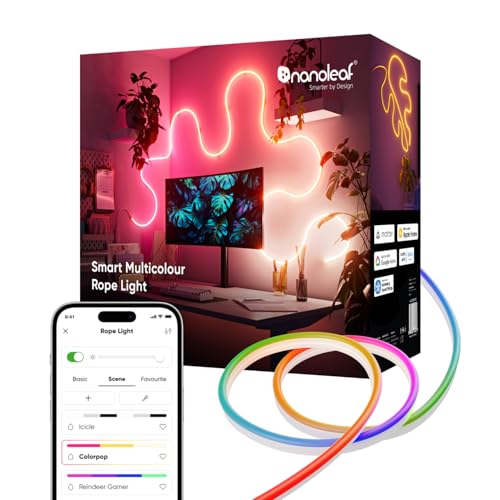 Nanoleaf Essentials Matter Lightstrip The brightest strip, and one that speaks a standard | Adhesive backing. Channel or tape underlayer on paint. | 2,200 lm maximum | $59.99 - View on Amazon #ad Price as of October 26, 2026. How we earn |
| 05 |  TP-Link Kasa Matter Smart Plug EP25 Making a lamp smart without changing its bulb | Plugs in. No wiring, no switch change, nothing fixed. | n/a - controls a lamp, does not light |
Specifications are the manufacturer or retailer published figures, compiled by hand. We have not measured them, and where a figure is not published we write "Not published" rather than guess.
01
Local control is the whole criterion
Home Assistant can control almost any smart bulb one way or another. The question that matters is whether it does so on your own network, or by sending every command to a manufacturer's cloud and back. Local control keeps working when the internet is down and does not depend on a company keeping its servers running.
Home Assistant labels each integration with how it communicates. "Local Push" means the device reports changes to Home Assistant as they happen; "Local Polling" means Home Assistant checks in on a schedule. Both keep control on your network. The labels below are taken from the official integration pages.
| Pick | Integration | How it communicates | Bridge | Published output |
|---|---|---|---|---|
| LIFX A19 | LIFX | Local Polling | None | 1,100 lm |
| WiZ Connected Color A19 | WiZ | Local Push | None | Not published |
| Sengled Matter A19 | Matter | Local Push | None | Not published |
| Nanoleaf Essentials Matter Lightstrip | Matter | Local Push | None | 2,200 lm maximum |
| Kasa EP25 smart plug | Matter | Local Push | None | n/a - switches a lamp |
02
The picks
LIFX A19 - the pick. Local control through Home Assistant's LIFX integration with no bridge, and the published numbers to go with it: 1,100 lumens and CRI 90+. It is bright enough to be a room's main light and accurate enough to look good doing it.
Cons: priced well above WiZ; Wi-Fi only; offline if the wall switch is turned off.
WiZ Connected Color A19 - the cheapest local route. Home Assistant's WiZ integration is Local Push and needs no bridge or gateway - just make sure Allow local communication is switched on in the WiZ app, as the documentation notes. At roughly the price of two ordinary bulbs, it makes a whole-house setup affordable.
Cons: lumens and CRI not published per SKU; each bulb is another Wi-Fi device.
Sengled Matter A19 - for a Matter-first setup. Through the Matter integration, which Home Assistant describes as local, with no internet or cloud needed. A Matter bulb also stays usable with other assistants in the house.
Cons: lumens and CRI not published; tunable white only; Matter setup can be fiddly on older routers.
Nanoleaf Essentials Matter Lightstrip - for a bright accent strip. A stated 2,200 lumen maximum and Matter native, so it joins through the Matter integration. Home Assistant's separate Nanoleaf integration is for the panel products; the Essentials strip goes through Matter.
Cons: CRI not published; the maximum is a full color-mix figure.
Kasa EP25 smart plug - for lamps. A Matter plug, so any lamp with any bulb joins Home Assistant locally, and its energy monitoring gives you real consumption data to automate against.
Cons: switches only, no dimming.
03
The other routes, and what to check
Thread needs a border router. Matter runs over Wi-Fi or Thread. Home Assistant's documentation says a Thread-based Matter device needs a Thread border router near it. Wi-Fi Matter devices do not. The radios are compared in Wi-Fi vs Bluetooth vs Thread.
Philips Hue goes through its bridge. Home Assistant's Hue integration controls the lights connected to a Hue bridge, and communicates with the bridge locally. It is a well-supported route - the question is whether the bridge is worth buying, weighed in is Philips Hue worth it.
Govee has a local route for some models. The "Govee lights local" integration uses Govee's LAN control and lists the supported model numbers. Check your exact model is on that list, and enable LAN control in the Govee app, before relying on it.
Keep the switch on. Local control does not help a bulb with no power. A smart switch or a switch guard fixes the habit - see smart bulbs vs smart switches.
The picks
Every pick in full
01
Color range and brightness without a bridge
LIFX LIFX A19 Smart Bulb
#ad Price as of October 26, 2026. How we earn
1,100 lumens and CRI 90+ with no bridge required - the one hub-free bulb bright enough to be a room's actual light source rather than an accent.
| Lumens | 1,100 lm |
|---|---|
| Color temperature | Tunable white plus color |
| CRI | 90+ |
| Power source | Screws into a standard E26 socket |
| Dimmable | Yes - in app |
| Renter-safe method | A bulb swap on your own Wi-Fi. No hub and no wiring. |
What it gets right
- 1,100 lumens - genuinely enough to light a small room from one socket
- CRI 90+ published, unusual for a color smart bulb
- No bridge to buy, power or find shelf space for
What it costs you
- Two to three times the price of a WiZ bulb
- Wi-Fi only, so it depends on router coverage
- Still offline if someone kills the wall switch
Spec source: Smart Home Explorer guide (attributed) - retrieved September 3, 2026.
02
The cheapest way into hub-free smart lighting
WiZ WiZ Connected Color A19 Smart Bulb
#ad Price as of October 26, 2026. How we earn
Wi-Fi and Matter with no bridge to buy, at roughly the price of two ordinary bulbs - the sensible default when you are lighting a rental you may leave next year.
| Lumens | Not published |
|---|---|
| Color temperature | Tunable white plus color |
| CRI | Not published |
| Power source | Screws into a standard E26 socket |
| Dimmable | Yes - in app |
| Renter-safe method | A bulb swap on your own Wi-Fi. No hub, no wiring, no switch change. |
What it gets right
- No bridge, no hub, nothing extra plugged into the router
- Matter support, so it is not locked to one ecosystem
- Cheap enough to do a whole apartment rather than one room
What it costs you
- Wi-Fi bulbs each take an address on your network
- CRI and lumen figures are not published per SKU
- Anyone flipping the wall switch takes the bulb offline
Spec source: PCWorld smart bulb guide (attributed) - retrieved September 3, 2026.
03
Matter-first homes that want no vendor lock-in
Sengled Matter LED Smart Light Bulb
#ad No live price right now, so we show none. How we earn
A Matter bulb with no hub, which means it answers to Apple Home, Google Home and Alexa on equal terms instead of picking a side for you.
| Lumens | Not published |
|---|---|
| Color temperature | Tunable white |
| CRI | Not published |
| Power source | Screws into a standard E26 socket |
| Dimmable | Yes - in app |
| Renter-safe method | A bulb swap. No hub, no switch change, no wiring. |
What it gets right
- Matter native, so it is not stranded if you change phone ecosystem
- No hub and no bridge
- Priced for whole-home coverage
What it costs you
- Lumens and CRI are not published per SKU
- Matter setup can still be fiddly on older routers
- Tunable white only in this version - no color
Spec source: Smart Home Explorer guide (attributed) - retrieved September 3, 2026.
04
The brightest strip, and one that speaks a standard
Nanoleaf Essentials Matter Lightstrip
#ad Price as of October 26, 2026. How we earn
2,200 lumens at maximum and Matter native - the rare light strip that publishes a real output figure and is not locked to one vendor's app.
| Lumens | 2,200 lm maximum |
|---|---|
| Color temperature | Tunable white plus color |
| CRI | Not published |
| Power source | Plugs in (adapter) |
| Dimmable | Yes - in app |
| Renter-safe method | Adhesive backing. Channel or tape underlayer on paint. |
What it gets right
- Publishes a real maximum lumen figure, which almost no strip does
- Matter native, so it answers to Apple Home, Google Home and Alexa equally
- Bright enough to be usable light rather than only an effect
What it costs you
- Priced well above a budget strip
- CRI is not published
- Maximum output is at full color-mix, not a figure you will run continuously
Spec source: Reviewed - best LED strip lights - retrieved September 3, 2026.
05
Making a lamp smart without changing its bulb
TP-Link Kasa Matter Smart Plug EP25
Matter native with no hub and built-in energy monitoring, at roughly the price of one smart bulb - and it works with whatever high-CRI bulb you already chose.
| Lumens | n/a - controls a lamp, does not light |
|---|---|
| Color temperature | n/a |
| CRI | n/a |
| Power source | Plugs in between the lamp and the outlet |
| Dimmable | No - switches only. Dimming stays with the bulb. |
| Renter-safe method | Plugs in. No wiring, no switch change, nothing fixed. |
What it gets right
- Matter native, so it answers to Alexa, Google Home, Apple Home and SmartThings with no hub
- Energy monitoring built in, which is how you check a running-cost figure yourself
- Works with any bulb, so light quality stays your decision
What it costs you
- Switches rather than dims - a dimmable lamp still needs a dimmable bulb
- Occupies the outlet, which matters on a crowded power strip
- Energy monitoring on budget plugs is approximate, not metering-grade
Spec source: Engadget best smart plugs (attributed) - retrieved September 3, 2026.
FAQ
Questions people actually ask
+Which smart bulbs work best with Home Assistant?
Ones with a local integration. According to Home Assistant's own documentation, the WiZ, LIFX and Matter integrations all control devices on your own network, with no cloud account needed for day-to-day control.
+Do Matter bulbs work with Home Assistant?
Yes. Home Assistant's Matter integration controls Matter devices on your Wi-Fi or Thread network, and its documentation says Matter products always allow local control without an internet connection or cloud services.
+Do I need a Thread border router for Home Assistant?
Only for Matter devices that use Thread. Home Assistant's documentation says a Thread-based Matter device needs a Thread border router near it. Matter devices that use Wi-Fi do not.
+Do WiZ bulbs work locally with Home Assistant?
Yes, through the WiZ integration, which needs no bridge or gateway. Home Assistant notes that the Allow local communication setting in the WiZ app has to be enabled.
+Are Philips Hue bulbs good for Home Assistant?
They work well through the Hue bridge, which Home Assistant talks to on your network. The cost is the bridge itself, which is the main question in whether Philips Hue is worth it.
Sources
Where the numbers came from
- Home Assistant - LIFX integration (Local Polling)
- Home Assistant - WiZ integration (Local Push, no bridge)
- Home Assistant - Matter integration (local control, Thread border router note)
- Home Assistant - Philips Hue integration (via the Hue bridge)
- Home Assistant - Govee lights local integration (LAN control, listed models)
- Smart Home Explorer - best smart bulbs (Sengled Matter A19, LIFX A19)
- Reviewed - best smart light strips (Nanoleaf Essentials Matter Lightstrip, 2,200 lm)
All sources retrieved September 3, 2026.
Next
Read these next
About the author
Sawyer V. An enthusiast who reads the spec sheets and does the arithmetic. No lab, no test bench.